 Tabko
Guide
Know what you can come back to.
Recovery, Trash and versions provide different ways to revisit local data. None replaces an exported backup.
Choose whether to enable recovery
- Open Tabko’s settings and find recovery.
- Enable local recovery snapshots if you want Tabko to keep a rolling record of browser sessions.
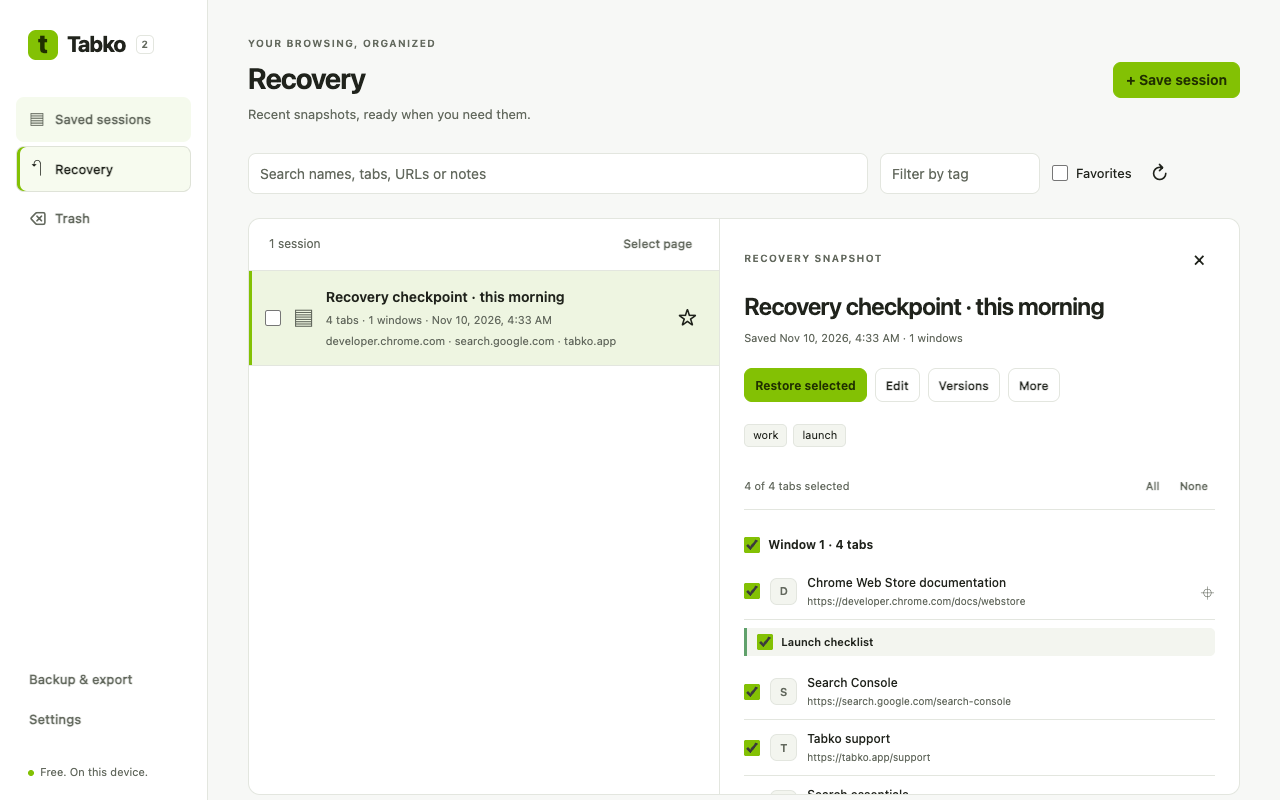
- Review the recovery area to check that snapshots are being captured.
- Inspect a snapshot before restoring, then choose the tabs you need.
Recover a deleted session
Open Trash, find the session and restore it before its 30-day retention period ends. Permanently deleting it removes this recovery path immediately. Retention cleanup happens through extension maintenance; do not depend on an expired item still being visible.
Return to an earlier saved state
Open a session’s version history, inspect the earlier version and use the available restore action. A session keeps up to 30 versions, so older versions can be removed as new ones are saved.
If the snapshot you need is missing
Check your named sessions, Trash, retained versions and any JSON backups. Tabko cannot recreate data it never captured, data already removed by retention, or data lost when Chrome storage was cleared.